MosaicHydro NTRIP Client
Receive RTK corrections from an NTRIP caster on one Windows PC and share them with every GNSS receiver on your vessel or site network, over serial, TCP and UDP at the same time.
Receivers on a vessel or site network often can’t reach the internet, and one internet connection often has to serve several receivers. The MosaicHydro NTRIP Client solves both. It connects to your correction service once, then passes the corrections to a receiver on a COM port, to any number of devices on the local network, or to all of them at once.
It follows the design of Lance Lefebure’s well-known NTRIP Client and adds network sharing, a TCP relay and a live status display.
Typical setups
| You have… | Use |
|---|---|
| A sonar with an embedded INS on a vessel network (for example, an R2Sonic sonar with an SBG INS) | Caster + TCP server |
| An NTRIP account and one receiver on a COM port | Caster + serial |
| An NTRIP account and several receivers on the network | Caster + TCP server |
| A tablet or app that only speaks NTRIP | TCP server in NTRIP caster mode |
| A VRS or nearest-base mountpoint | Position (GGA) upload |
| A base station given as “TCP Client, IP and port” | TCP relay |
| Listeners that only accept UDP | UDP server |
Features
Caster connection
- NTRIP revision 1 and 2, with optional TLS
- Sourcetable browser, sortable by distance from your position
- Automatic reconnect, a no-data watchdog and clear login and mountpoint errors
- Automatic GGA upload for VRS and nearest-base mountpoints
Outputs
- Serial: sends corrections to a receiver and reads its NMEA back. Reopens the port after a USB unplug.
- TCP server: any number of clients at once. NTRIP-only apps such as SW Maps, QField and Emlid Flow can use this PC as their caster.
- UDP: fixed addresses, LAN broadcast, or devices that register themselves.
- TCP relay: for base stations that are a plain TCP server. This PC connects out and local receivers connect to it.
Monitoring
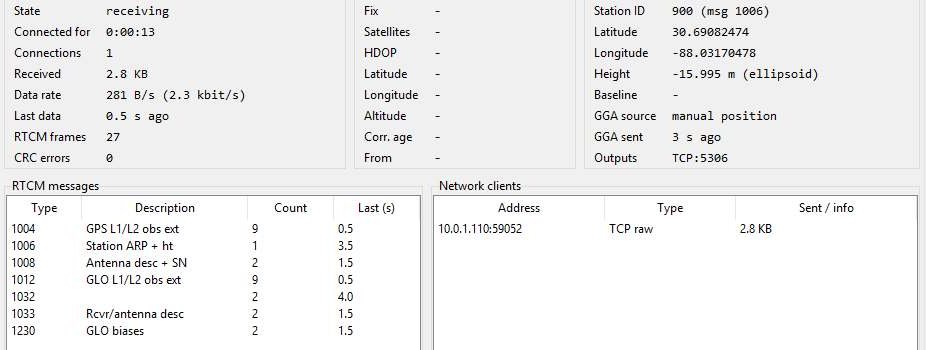
- Live status: data rate, RTCM message table, base station ID and position, baseline length, rover fix and connected clients
- Logging of raw RTCM, receiver NMEA and application events
- Saved setups for each vessel or site, and a headless command-line version for unattended PCs
Getting started
- Download the ZIP file and extract it. It contains the program, a command-line version, the user manual and example settings.
- Run MosaicHydro NTRIP Client.exe. Nothing needs installing.
- On the Caster tab, enter your correction service details, press Get sourcetable and choose a mountpoint.
- Turn on the outputs you need, then press Connect.
The user manual walks through each tab and includes an illustrated setup for an R2Sonic sonar with an embedded SBG INS. Questions or suggestions? Email tools@mosaichydro.com.
Provided free of charge, as is, with no warranty. The design follows Lance Lefebure’s free, open-source NTRIP Client.